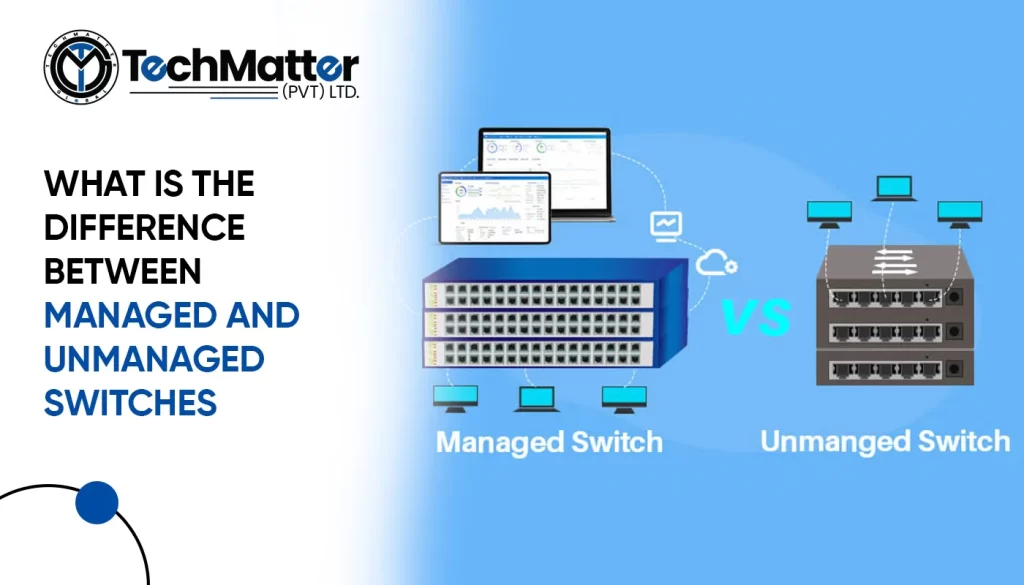
Managed and unmanaged switches are the two primary categories. Both link devices in a network, but their management, usefulness, and adaptation differ. In this article, we will compare managed and unmanaged switches so you may choose one based on your networking needs.
What are Unmanaged Switches
Unmanaged switches are the simplest form of switches available in the market. They are plug-and-play devices that require minimal configuration. Unmanaged switches operate at the data link layer of the OSI model and are primarily designed to forward data packets from one device to another without any intervention.
What are Managed Switches
On the other hand, managed switches provide network administrators with greater control and flexibility. They offer advanced features and functionality beyond basic data forwarding. A web-based GUI or CLI may remotely configure and control managed switches. They help network managers improve performance, monitor traffic, secure networks, and prioritize data traffic.
Below are the differences between managed and unmanaged switches as per their functionalities.
-
Configuration and Control – Unmanaged and Managed Switches:
As previously mentioned, unmanaged switches are preconfigured devices that do not require any manual setup. They are designed for small networks and home environments where simplicity is prioritized over customization. Unmanaged switches have fixed settings and cannot be modified or managed by network administrators.
Network administrators may customize managed switches’ behavior using various configuration choices. Administrators may configure VLANs, QoS settings, port mirroring, and other advanced features using the administration interface. This level of control enhances network performance, security, and troubleshooting capabilities.
-
Network Monitoring and Troubleshooting – Unmanaged and Managed Switches:
Unmanaged switches provide limited visibility into network traffic. They need monitoring and troubleshooting capabilities, making identifying and resolving network issues easier. In case of network congestion or packet loss, unmanaged switches offer little insight into the root cause of the problem.
Managed switches enable comprehensive network monitoring and troubleshooting. SNMP and RMON can help network managers gather data on performance. This information allows administrators to rectify issues, optimize network resources, and assure effortless network operation.
-
Scalability and Flexibility – Unmanaged and Managed Switches:
Unmanaged switches are suitable for small networks with a limited number of devices. They lack the scalability required for more extensive networks and cannot quickly accommodate additional features or expand the network infrastructure.
Managed switches provide the flexibility and scalability needed for growing networks. They can handle a higher number of devices, support advanced features, and adapt to changing network demands. As the network grows, managed switches let administrators add or remove devices, add functionality, and change configurations.
Summary
In summary, managed and unmanaged switches differ significantly in functionality, control, and scalability. Unmanaged switches are ideal for small networks and residences due to their simplicity. Managed switches offer advanced configuration, network monitoring, and scalability, making them perfect for more extensive networks or companies that need more control and flexibility. Understanding these distinctions can help you make an educated selection.
As switches are essential to every network, IT professionals must grasp their functionality. You must know their differences to completely understand Layer 2 and Layer 3 switches. Each network’s switch is crucial; thus, you must grasp its operation. This article defines Layer 2 and 3 switches and helps you choose the right one for your network connection.
Layer 2 and Layer 3 Switches: What Are They?
Layers 2 and 3 switches are part of the OSI model, which describes network communications. OSI comprises seven layers: application, presentation, session, transport, network, data connection, and physical. Layer 2 and layer 3 switches, which function in these layers, characterize OSI model layers.
A switch is a piece of hardware that transmits data packets over a local network. What is the benefit of the hub? A hub floods the network with packets, but only the intended recipient system receives them; all other systems drop them, which causes a significant rise in traffic. A switch was introduced to address this issue. A switch first ascertains which port a specific device is attached to by flooding the network, much like a hub would do, to fill the MAC address table.
A Layer 2 switch usually connects all network and client devices. Converged networks and the growing range of network applications are helping layer 3 switches thrive in data centers, complicated enterprise networks, and commercial applications.
What are the differences between Layer 2 and Layer 3 Switch?
The routing function is the primary distinction between layers 2 and 3. Only MAC addresses are taken into consideration by Layer 2 switches.
Layer 3 switches, commonly called multilayer switches, can perform all of the duties of layer 2 switches in addition to static and dynamic routing.
A Layer 3 switch is equipped with MAC address and IP routing tables, and it supervises packets’ routing within and between VLANs. Layer 2+ (Lite) switches add static routing capabilities.
Instead of manually establishing ports, Layer 3 switches tag VLAN traffic based on the IP addresses of the packets in the traffic. Power and safety measures are applied to Layer 3 switches as required.
The MAC address table on Layer 2 switches sends “Frames” to the target port. This table maintains the mac address of the device connected to the port.
Layer 3 switches, commonly utilized on VLANs, are responsible for routing packets on the network layer of the OSI model by using IP addresses.
Layer 2 or Layer 3 Switches: What should you choose?
Before lingering between Layer 2 and Layer 3 modifications, it is essential to think about the application used. If your entire domain is Layer 2, you can utilize a switch that only supports that layer. Because the hosts are connected to a Layer 2 domain, a Layer 2 switch will perform as expected.
The term “access layer” is often used to refer to this part of a network structure. It is necessary to have a Layer 3 switch to route traffic between VLANs and to govern the aggregation of several access switches. The distribution layer is the name given to this part of the network topology.
The Layer 2 switch is your best option if you require a short control for a quick, in-network connection. In contrast, if you need a switch that can interact directly with devices outside your network, you need a Layer 3 switch.
However, Layer 3 switches are only helpful in intranet contexts where device subnets and traffic are sufficiently large. These gadgets are primarily useless on home networks.
Conclusion:
Depending on your demands, you can choose different switch types. Switches at Layer 2 are frequently used to lessen data load on a LAN. An unidentified device attempting to access the network will be rejected because they only use MAC addresses. Layer 3 switches, on the other hand, are mainly utilized to manage VLANs and enhance security. Data flow is improved, and collisions are decreased thanks to VLANs. Congested networks can increase data rates with the use of Layer 3 switches. While it’s only sometimes best to use the most sophisticated technology, you should always choose the tools most suited to the job and per your exact use.
When constructing a network for a small office, switches and routers are the two pieces of equipment necessary. Although they have a similar appearance, the two devices each serve distinct purposes within a connection.
In the world of computer networks, routers and switches play similar roles. While switches link devices, routers operate at the network layer and are responsible for determining the quickest route for a packet across the network.
Routers allow devices to communicate with one another despite being on different networks. As you read this article to learn more about these two types of network equipment, the contrasts between them will become clear.
What is a Network Switch?
Network switches link devices on a single computer network. Switching hubs, bridge hubs, and MAC bridges are other names for switches. The switch employs the MAC address to send the data to the right place. The switch is a layer two device that operates at the data link layer. It receives, processes, and sends data using packet switching. They can also function at OSI layer 3, the “network layer,” where routing operations occur. Network switches connect desktop PCs, business equipment, wireless access points, and some Internet of Things (IoT) devices, like online card entry systems.
The Primary Uses of Network Switch
- Enables the control of data flow over a network
- They are connectable and can manage medium to big LANs.
- They are frequently used in Small Office/Home Office (SOHO) applications that use a single switch to access a variety of bandwidth providers.
- Connect network devices physically.
- Supports both half-duplex and full-duplex modes for data transfer to and from other devices.
Different Network Switches
Numerous types and categories of network switches are available to serve various purposes. Which are:
Managed switches
Managed switches, most prevalent in commercial and enterprise environments, provide IT professionals with higher capacity and capabilities. Interfaces for the command line are used to set up managed switches. They enable straightforward network management protocol agents, which provide data for resolving network problems.
In addition, administrators can use them to establish virtual LANs to subdivide a local network. Due to the added functionality of managed switches, they are significantly more expensive than unmanaged switches.
Unmanaged switches
Unmanaged switches with a fixed configuration are the most basic. An unmanaged switch enhances the Ethernet connections of a local area network (LAN), allowing for more internet connections on local devices. A device’s media access control (MAC) address is used to communicate between an unmanaged switch and another device. Since they plug in, the user has few options to consider.
These switches may have non-modifiable default configurations for features such as quality of service. Unmanaged switches are inexpensive, but their limited capabilities make them inappropriate for many corporate applications.
LAN (Local Area Network) switches
Local area network switches, often known as “LAN switches,” are frequently used to connect sites on an organization’s internal LAN. In some circles, it is also known as an Ethernet switch or a data switch. The optimal bandwidth allocation prevents data packets from overlapping as they move through a network. The LAN switch transports the data packet to its destination before forwarding it. These switches eliminate network congestion and bottlenecks by sending a packet of data only to its intended receiver.
The KVM switch, or keyboard, video, and mouse
This switch allows many computers to connect to a keyboard, mouse, or monitor. These switches are a common choice to manage multiple servers at once and free up desk space. A KVM switch allows users to control multiple computers from a single console. You can easily switch between PCs by configuring the keyboard hotkeys that are usually built into these devices. A KVM extender can increase the switch’s transmission range by several hundred feet when transmitting DVI, VGA, or HDMI video signals.
The Benefits and Drawbacks of Network Switches
Benefits of Network Switches
- Using a switch minimizes the number of broadcast domains. A vast amount of broadcast traffic can severely influence a network. Hence, it is prudent to consider decreasing the number of broadcast domains.
- Switches assist logical segmentation by supporting VLANs (referred to as VLAN communication). LAN management, security, and administration all benefit significantly from logical segmentation.
- Switches map ports to MAC addresses using the Content Addressable Memory (CAM) database.
- As the switch is completely separate from the network, only the recipient will receive the information.
Drawbacks of Network Switches
- In terms of limiting broadcast, switches need more routers for better performance
- Switches need inter-VLAN routing to allow VLAN communication. It is crucial to remember that there are numerous multilayer switches accessible nowadays.
- Switches need some settings and an exemplary architecture to handle multicast packets.
- When using a switch, it might be challenging to pinpoint the source of a network connectivity issue.
What is a router?
An OSI Layer 3 router operates (Network Layer). It is a networking device that performs two primary tasks:
- Setting up and maintaining a local area network (LAN),
- Controlling data as it enters, travels through,
- and exits a network (sort of like directing traffic).
A router joins switches and their networks to construct more extensive networks, whereas switches connect devices to form networks.
A router establishes an internet connection between a network and the outside world, selects which devices receive priority, and safeguards data from security risks. Additionally, many routers come with built-in switches that enable network device communication.
The Primary Uses of Routers
- Can establish a LAN
- enables the internet connection to be split among all network devices
- Supports connecting various media and devices
- Has the ability to run a firewall
- Allows you to choose where to send data from one machine to another.
- Capable of performing packet forwarding, switching, and filtering
- Ensures that data arrives at its target location
- Has the ability to connect to a VPN (VPN)
Different types of routers
Wireless
It can be found everywhere—at work, at home, at the railroad station, etc. It generates a radio signal. Assuming you are at the office, we can use wireless signals to connect to the internet because your laptop is in the signal range. By providing our user ids and passwords, we are able to provide security for routers. The router will request a password and UserId when we attempt to connect to it. A user ID and password are included with the gadget. No user information is harmed because of security. When we go to public places, a Wi-Fi window will pop up so we can use the internet on our phones. You can see that it is password-protected when you see it. Public access to wireless routers is possible. It allows N users to connect.
Wired router
The meaning of the name is obvious. It is possible to connect to the network using a wire. If we go to a bank, small college, or business, we can see a PC or laptop wired to the internet via an Ethernet cable. It has a wireless access point. Users can use VIOP to link up with the phone if they like (voice-over-IP technology). There is an ADSL (modem) with two connectors for Ethernet and cell phone connections.
Edge Router
It resides at the border of the network’s infrastructure and can link to the core routers. It will route packets of information via a network or multiple networks, which can be either wired or wireless. However, it won’t transfer internet data packets between networks.
Core Router
It is made to function as the core or backbone of the internet. It enables a variety of fundamental internet-compatible, high-speed telecommunication interfaces. All of them have full IP packet forwarding capability. It is capable of using the core’s routing protocol. It will disperse internet data packets around the network. However, the core won’t send internet data packets across networks.
Virtual Router
It is the standard setting for a computer-sharing network. It operates under the VRRP. It comes online when the primary router is broken or turned off. It needs several routers in a group to share a virtual IP address. Each group has a master who manages the IP packets. Other routers will assume control if the master fails while delivering packets.
The Benefits and Drawbacks of Routers
Benefits of Routers
- Routers manage data packet delivery, which helps to reduce data load.
- Between network hosts, routers provide dependable and steady connectivity.
- Routers include backup methods for transferring data packets if a significant component fails to do so.
- It may select the most advantageous route over the Internet using dynamic routing algorithms.
- By establishing collision domains and broadcast domains, it can reduce network traffic.
- To ensure that there are alternate paths, permit the achieving loop.
Drawbacks of Routers
- Bridges and repeaters cost less than routers.
- Unlike hubs, routers only support routable network protocols.
- Because routers must examine data transfer from the physical to the network layer, they are noticeably more sluggish than bridges and repeaters.
- Communication between dynamic routers increases network traffic.
- Routers are relatively complicated systems.
- Sometimes it requires a lot of initial configuration.
- These devices are protocol-dependent and must comprehend the protocol they are sending.
Key differences between Routers and Switches
The information that has been provided so far about switches and routers should be able to explain their distinctions and how they are both essential components of IT systems. The following table further outlines the fundamental differences between the two devices.
| Routers | Switches |
| 1. Routers function at the OSI model’s Layer 3 (Network). | Network switches function at OSI model layer two (Data Link Layer). |
| 2. The wireless connection has a speed restriction of 1–10 Mbps, while the cable connection has a speed limit of 100 Mbps. | The switch has a maximum speed of 10/100 Mbps in operation. |
| 3. Aids consumers in making the quickest routing choice | Most likely to choose a more challenging route |
| 4. The router is more efficient in different network situations (MAN and WAN) than the switch. | A switch can perform better than a router in a local area network. |
| 5. Routers are flexible networking devices that can function in wired or wireless networks. | Switches can only link to networks via wired connections. |
| 6. The main job of a router is to connect multiple networks at the same time. | Switches’ primary function is to connect multiple devices at once. |
| 7. A router can only connect to networks when there are at least two to join. | A switch can only connect to one network at a time. |
Key takeaway
We know that the distinctions between a switch and a router need to be understood more. On the other hand, if you put in the effort to learn how each piece of equipment operates, it will be easier for you to locate the most suitable tool for your network.